
Searching with regular expressions
Layers that support the use of regular expressions are denoted by their pattern inputs having Regular expression or Regular expression (A≠a) in the input box.
A regular expression (or ‘regex’) is a compact way of finding a pattern in a string of text. In APLS, for example, searching the orthography layer for do.* will return all words that start with the characters do (including the word do itself).
Regular expressions are a feature of many programming languages, so you may have used them before. Even seasoned regex users can use a refresher once in a while. For new users, regex can be a little intimidating because they are so compact and can use a lot of special symbols.
If you are…
- hoping to learn regex, read the introduction to regex
- hoping to use some simple patterns (but you don’t need to learn regex), read about common regex “idioms”
- just looking for a refresher on what the symbols mean, read the cheat sheet
- experienced with regex in other contexts, read about how regex is different in APLS
On this page
Regex cheat sheet
Here are the regex patterns you’re most likely to use when searching APLS:
| Character/pattern | Type | Meaning |
|---|---|---|
Letters & numbers (A-Z, a-z, 0-9) | Literal | Themselves |
| Most special characters used in layer notation systems | Literal | Themselves |
. | Wildcard | Any single character |
[] (example: [abc]) | Character class | Match any single character inside the brackets |
[^] (example: [^abc]) | Character class | Match any single character other than the ones inside the brackets |
[-] (example: [f-i]) | Range | Match any single letter or digit in the range (including the endpoints) |
() | Grouping | Characters inside the parentheses are treated as a unit; used in conjunction with a quantifier or alternator |
? | Quantifier | The character (or character class, or group) before ? is optional; i.e. it can occur 0 or 1 times |
+ | Quantifier | The character (or character class, or group) before + can repeat; i.e. it can occur 1 or more times |
* | Quantifier | The character (or character class, or group) before * is optional or it can repeat; i.e. it can occur any number of times, including 0 |
| (example: ab|cd) | Alternator | Match the left or right side |
\ | Escape | The character after \ is not treated as a metacharacter; i.e., the character is treated literally |
Because of the notation systems used by certain layers, the characters in APLS that you may need to use \ to match literally are:
| Layer(s) | Character | Meaning |
|---|---|---|
| morphemes | + | Morpheme boundary |
| word | . | Short pause |
| word | - | Long pause |
| word | ? | Question or question intonation |
| prec_segment, foll_segment | . | Preceding or following pause |
| pronounce | - | Syllable boundary |
| segment, foll_segment, prec_segment, syllables, phonemes, dictionary_phonemes, pronounce | { | DISC symbol for the IPA /æ/ vowel |
| segment, foll_segment, prec_segment, syllables, phonemes, dictionary_phonemes, pronounce | $ | DISC symbol for the IPA /ɔ/ vowel |
| part_of_speech | $ | Used in the part-of-speech tags $ (currency symbols), PRP$ (possessive pronoun), WP$ (possessive wh- pronoun) |
Common regex idioms
These are the patterns you’re most likely to need when searching APLS:
- Dot-asterisk (
.*): Match anything or nothing - Dot-plus (
.+): Match one or more of any character (doesn’t have to be the same character) - Square brackets (
[]): Match one of the characters in the brackets - Square brackets with a caret (
[^]): Match anything other than the characters in the brackets - Vertical pipe (
|): Match one of the strings on either side of the pipe
Dot-asterisk (.*)
Dot-asterisk .* can be used at the beginning, end, and/or middle of a pattern to denote “anything (or nothing at all)”. APLS searches look for whole word matches, so using .* is useful at the edge (beginning or end) of patterns when you are looking for strings that can appear in multiple words.
| Pattern | Explanation | Examples |
|---|---|---|
do.* | Any word that starts with do | do dot dotted dig ado boot |
.*king | Any word that ends with king | king seeking asking kings kin doing |
.*tend.* | Any word that contains tend | tend tender extendNintendo ten tinder |
a.*n | Any word that starts with a and ends with n | an again attention in apple and |
Dot-plus (.+)
Dot-plus .+ can be used at the beginning, end, and/or middle of a pattern to denote “at least one of any character”. The important distinction between .+ and .* is that .+ requires there to be at least one character in that position, as shown with the examples below.
| Pattern | Explanation | Examples |
|---|---|---|
do.+ | Any word that starts with do except do | dot dotted do ado |
.+king | Any word that ends with king except king | seeking asking king kings kin |
.+tion.+ | Any word that contains tion and has characters on both sides of tion | questions recreational action question |
a.+n | Any word that starts with a and ends with n except an | again attention an in and |
Square brackets ([])
Square brackets [] can be used to match any one of the characters within the brackets. The characters within the brackets are a character class.
| Pattern | Explanation | Examples |
|---|---|---|
do[tg] | Any 3-letter word that starts with do and ends with t or g | dot dog do doe dotted |
[dw]on't | Any 5-character word that starts with d or w and ends with on't | don’t won’t donut want |
.*[oau][td] | Any word whose last two characters are o or a or u followed by t or d | cut glad float cost cots cut |
Importantly, square brackets always match a single character:
| Pattern | Explanation | Examples |
|---|---|---|
r[oau]t | Any 3-letter word that starts with r, then o or a or u, and ends with t | rot rat rut rout root |
Square brackets with a caret ([^])
Square brackets can be inverted with ^ to match anything other than the characters in the brackets. Inverted square brackets will still only match a single character, similar to normal square brackets.
| Pattern | Explanation | Examples |
|---|---|---|
do[^t] | Any 3-letter word that starts with do and does not end with t | doe don do dot dotted |
b[^eu]t | Any 3-letter word that starts with b, then any character other than e or u, and ends with t | bot bat bit bet but boat bots |
Vertical pipe (|)
Vertical pipes | can be used to specify multiple possible patterns at once. These can be useful when you’d like to find multiple words with the same search.
| Pattern | Explanation | Examples |
|---|---|---|
steeler|penguin | The word steeler or the word penguin | steeler penguin steel penguins pirate |
steel|pen.* | The word steel or any word that starts with pen | steelers pencil steel bullpen pirate |
(steel|pen).* | Any word that starts with steel or pen | steelers pencil steel bullpen pirate |
b(oo|ea|u)t | Any word that starts with b, then oo or ea or u, and ends with t | boot beat but boat bet bit |
(wh|th|sh).* | Any word that starts with wh or th or sh | what though short other slush |
The 2nd and 3rd rows of the previous table demonstrate something important to keep in mind when using
|: The vertical pipe applies to the entire match unless you use parentheses. (Just like mathematics operators, regex metacharacters have an “order of operations” that can be overridden with parentheses.) As a result, the regexsteel|pen.*matches the entire wordsteelor any word that starts withpenbecause it matchessteelorpen.*; the regex(steel|pen).*matches any word that starts withsteelorpenbecause it matchessteel+.*orpen+.*.
Introduction to regex
In regular expressions, letters and numbers are literal characters that match themselves. For example, the regex test will match the literal text “test”.
What makes regular expressions more powerful than normal searches are metacharacters that have special functions. These special functions allow you to match patterns that are more flexible than searches for literal words. For example, the regex test.* will match not only “test”, but also “testing”, “testify”, “testy”, “tests”, and “tested”.
Metacharacters are denoted using punctuation symbols, which means that regex can look confusing and hard to read at first. However, regex patterns get easier to decode once you understand the meanings of the different metacharacters.
Metacharacters can be grouped into a few categories based on their functions:
- A wildcard can match any character
.is a wildcard that will match any single character
- A quantifier controls the number of times a pattern can match
- The most useful quantifiers are
?(match 0 or 1 times),+(match 1 or more times), and*(match 0 or more times)
- The most useful quantifiers are
- A character class lets you specify a set of possible characters for a match
- Character classes are created with
[]
- Character classes are created with
- A group treats multiple characters as a unit, which lets you control the scope and order of operations in a regex
- Groups are created with
()
- Groups are created with
- An alternator lets you match either the pattern before or the pattern after the alternator
- The vertical pipe
|is the alternator symbol in regex
- The vertical pipe
The most useful metacharacters for searching APLS are provided in the Regex cheat sheet.
The table below gives some examples of how characters and metacharacters can be combined to form regex search patterns for the orthography layer:
| Pattern | Explanation | Examples |
|---|---|---|
do. | Any three-letter word that begins with do | dot dog dig do dogs |
pittsburgh(ese)? | The word pittsburgh must be matched but it can optionally end with ese | pittsburgh pittsburghese pittsburgher pitt pittsburgh’s |
to+ | The letter t followed by one or more o | to too tot two do |
pittsburgh.* | Any word that begins with pittsburgh | pittsburgh pittsburghesepittsburgh’spittsburgher pitt philadelphia |
To search for every instance of “town”, “downtown”, and “hometown” in APLS:
- Go to the Search page.
- Enter
(down|home)?towninto the orthography input box.- Click the Search button.
For more examples of building regex search patterns, go to Common regex idioms.
Practicing regex in APLS
Now that you’re familiar with the basics of regex, it’s time for you to try searching APLS with regex patterns on your own! You can find some practice search questions below, with solutions included as “Try it!”s.
- How would you find all words that (1) start with vowels and (2) are at least 2 letters long?
- Go to the Search page.
- Enter
[aeiou].+into the orthography input box.- Click the Search button.
- How would you find all words that end with either -ing or -ize?
- Go to the Search page.
- Enter
.+i(ng|ze)into the orthography input box.- Click the Search button.
- How would you find all words that have three consecutive orthographic vowels?
- Go to the Search page.
- Enter
.*[aeiou][aeiou][aeiou].*into the orthography input box.- Click the Search button.
- How would you find all words that either start with q or end with x, excluding instances of q and x on their own?
- Go to the Search page.
- Enter
q.+|.+xinto the orthography input box.- Click the Search button.
Regex and error messages
If you use regular expressions, you are bound to get errors—regardless of whether you’re a regex newbie or a seasoned regex practitioner. Don’t sweat the errors when you get them!
Fortunately, the Search page makes it easy to check whether your regex are valid. If you enter an invalid regex, the text in the input box will turn red. Here’s what it looks like when you enter * in the orthography input box:

After a few seconds, if the regex is still invalid, a “speech bubble” will pop up with an error message:

As you can see, a speech bubble has popped up with the message Nothing to repeat.
The speech bubble disappears after a few seconds. If you missed it and want to see the error, hover over the input box for a tooltip:

To understand why this regex is invalid, remember that the regex character * means “0 or more of the preceding character (or character class, or group)”. As a result, * can’t be at the start of a regex. As the message says, if * is at the start of the regex, there’s nothing before * that * can repeat.
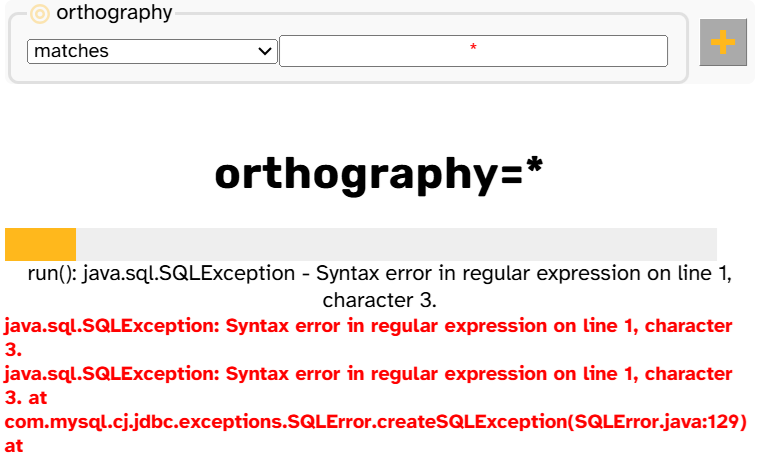
If you see red text in an input box, you should not press the Search button, but fix the regex error first. If you do attempt to search with an invalid regex, the search will fail with a long (and frankly scary-looking) error message:
Error messages you might encounter
Here are some regex error messages you might see, with examples and explanations.
The text of the error message can vary based on your browser. For example, the regex
(will yield the errorUnterminated groupin Chrome butunterminated parentheticalin Firefox. For this table, we checked Chrome (version 156) and Firefox (version 153). If there’s one error message in a row, both browsers use that message; if there are two, the first is from Chrome, the second Firefox.
| Error message | Example regex that can yield this error | Explanation |
|---|---|---|
Nothing to repeat | ?, +, *, ?abc, *def | Quantifiers apply to the character or pattern that is immediately before them |
Unterminated group or unterminated parenthetical | (, abc(, (def | Every ( has to have a ) later in the regex |
Unmatched ')' or unmatched ) in regular expression | ), abc), abc)def | Every ) has to have a ( earlier in the regex |
Unterminated character class | [, abc[, ]def | Every [ has to have a ] later in the regex |
Lone quantifier brackets or raw bracket is not allowed in regular expression with unicode flag | ], {, } | Same as above |
Empty character class | [], abc[]def | Character classes can’t be empty |
\ at end of pattern | \, abc\ | Escapes apply to the character or pattern that is immediately after them |
If your regex is invalid for multiple reasons, you’ll only see the first error message. For example, the regex
?[]is invalid for both the regex-initial?and the empty[], but only the error messageNothing to repeatwill be displayed. Once you fix the first error, the tooltip will change to reflect the next error.
Regex in APLS vs. regex elsewhere
APLS’s search regex syntax is very similar to standard “flavors” of regex in high-level programming languages (e.g., Python, R, JavaScript), with some important differences.
Search page: Regex match whole annotations, not parts
Unlike regex elsewhere, APLS’s search matches patterns to whole annotations, whether those are words, part-of-speech tags, segments, etc.
If you’ve used regex in other contexts, you are probably used to patterns matching any part of a string. For example, in Python, the regex the matches the strings the, these, and other. However, the will only ever match the in APLS. To search for patterns that occur within annotations, use .* at the beginning and/or end of the regex. For example, searching APLS with .*the.* will find matches for the, these, and other. (This also means that the anchors ^ and $ aren’t necessary because patterns always match entire annotations.) The table below shows the APLS equivalent of standard regex anchor expressions, along with example matches.
| Standard regex | How it matches in APLS | Translated for APLS | How it matches in APLS |
|---|---|---|---|
the | the these other | .*the.* | the these other |
^the | the these theater | the.* | the these theater |
the$ | the soothe bathe | .*the | the soothe bathe |
^the$ | the | the | the |
In the context of regular expressions beyond APLS, “anchors” are the metacharacters
^and$. In APLS searches, “anchoring” refers to anchoring a search match to a larger annotation, such as finding words at the start of a turn. This is covered on the Anchoring searches page.
Participants and Transcripts pages: Regex match parts
When browsing participants or transcripts, you can specify filters to narrow down the list of matches. Some of these filters accept regex, like the participant or transcript name. Unlike search regex, these regex do match parts of the label (no need for .* at the beginning and/or end of the regex). For example, on the Participants page, entering 1 in the Participant box will match participants with 1 anywhere in their speaker code. This also means that ^ and $, which anchor patterns to the start and end (respectively) of the match, do work in these filters For example, on the Participants page, entering 1$ in the Participant box will match participants whose speaker codes end with 1.
Regex are case-sensitive only in certain contexts
In most contexts outside of APLS, regular expressions are case-sensitive by default, though users often have the choice to treat regex as case-insensitive. In APLS, case-sensitivity is determined by context and cannot be controlled by users. In search, the only case-sensitive layers are word and layers with phonological data type. word is case-sensitive because capitalization may signal lexical differences (for example, between the month May and the verb may); see this callout for info on how to search word for these differences. Phonological layers (like segment) are case-sensitive since there are DISC symbols that differ only by case, such as t (IPA /t/) vs. T (IPA /θ/). As a hint to case-sensitivity, the input boxes for word and phonological layers have Regular expression (A≠a).
On the Participants and Transcripts pages, filters that accept regular expressions are always case-insensitive.
Regex use POSIX Extended Regular Expressions
One confusing aspect of working with regular expressions is that there is not just one regular expression syntax, but rather different regex “flavors”. As a result, regular expressions that work in one programming language or software context may not work in another.
APLS searches use POSIX Extended Regular Expressions (ERE). This is because APLS performs searches in MySQL (i.e., with the MySQL REGEXP operator). This means that, compared to PCRE regular expressions that are currently standard in high-level programming languages, features like backreferences and lookarounds are not supported.
While APLS uses MySQL for the server-side processing of search regex, live in-browser regex error-checking is powered by JavaScript’s
new Regexp()with the"u"(Unicode) flag. There are some small differences between the two, but in developing the user interface for APLS, we’ve done our best to code the input box to close the gap between the two regex engines. The error messages are mostly self-explanatory, but you can look them up here if needed.
Regex tips and tricks
Here we’ve collected some tips and tricks for using regex with APLS that are broadly helpful for users at any level of regex proficiency!
Checking your search matches
When you perform a search and the Search results page contains a handful of matches, it can be easy to manually check how many unique items your search matched. APLS contains over 500,000 word tokens, so often a search will result in a lot more than a handful of matches! Even if you export your search results as a .csv, it can be difficult to identify all the unique item matches if one or two items are much more frequent than the rest.
The Export Dictionary export option on the Search results page lets you download a .txt file of every unique individual item that your search matched. This can be helpful for quickly checking that the matches you got line up with what you were expecting!
- Go to the Search page.
- Enter
don.*into the orthography input box.- Click the Search button.
- On the Search results page generated by your search, click the
Dictionary button.
- Save and view the file to see what words in APLS match the
don.*orthography search pattern.
Other resources for learning about regex
This page is only meant to be an introduction to regular expressions (and the ways that regex is different in APLS). There are lots of resources out there for learning and practicing regex if you would like more than this page can provide!
A few places that we would recommend are:
- regex101.com for testing out different regex patterns.
- regexone.com or regexlearn.com for learning regex by practicing with simple, interactive exercises.
- regular-expressions.info tutorial for more details about basic regex concepts.
- The regular-expressions website also has resources for learning about more advanced regex concepts!